Do the work
01 · Ask
Say it once, in plain words.
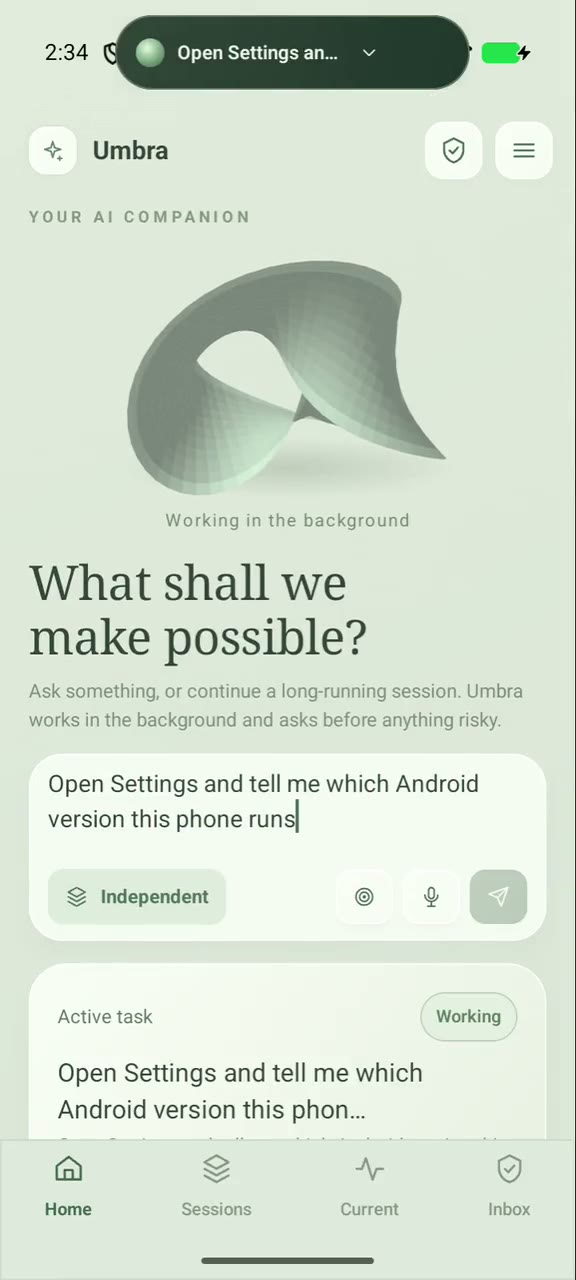
Type or speak a task on Home and send it. It becomes a persistent session you can follow, steer or leave alone. Models are yours: Anthropic, OpenAI, Google, OpenRouter, or any OpenAI-compatible server.
- Home composer with text, voice and a project picker
- Steer or queue a follow-up while it works
- Bring your own model and key
02 · Operate
It operates your phone, app by app.
Umbra reads the screen through the accessibility tree first, and takes screenshots only when it needs them. It taps, types, scrolls, opens apps, and reads notifications and logs — then verifies that each action did what it should.
- Accessibility tree first, screenshots when needed
- Taps, types, scrolls, launches apps
- Notifications and device logs as tools
- Every action is checked after it runs
03 · Background
It works in an invisible display while you use the phone.
The agent can run apps on a background display that you never have to see. Open Displays any time to watch the screen it is working on — here, a freshly built app being signed into.
- Background displays through the privileged helper
- Watch live from the Displays page
- Your own screen stays yours
04 · Build
A real Linux machine in your pocket.
A Debian environment with bash, git, Python and Bun, plus add-on toolchains: C/C++, Java, Node, Android app builds and a virtual desktop. In this clip the agent builds an Android app, installs it, reproduces a crash, reads the log, fixes the source and ships it again.
- Workspaces both Android and Linux can see
- Build, test, install, verify — one loop
- Carried inside the APK: setup needs no network
05 · Capsule
A capsule over every app.
The camera-anchored Capsule shows the task, its approvals and a quick composer above whatever you are doing. Long-press it, circle part of the screen, and send that selection with your question: Snapshot selection sends the cropped picture and its accessibility text.
- Task status, approvals and composer in one place
- Snapshot selection: circle it, ask about it
- Previous / Current / Next at a glance
Keep it running
06 · Plan
Plans that can evolve safely.
Planning & Agents shows the phase DAG, the agent tree and the wait graph for each session, with a read-only revision history. You see how work is split, who waits for whom, and what changed.
- Phase DAG · Agent tree · Wait graph
- Read-only revision history
- Todo lists the agent writes itself
07 · Capacity
Resource governance, made legible.
A phone is not a server. Umbra measures free RAM and storage and decides how many agents may run. A request the phone cannot run now waits in a fair, visible queue as a logical agent, then starts by itself. Shared services and runners are watched with evidence, not promises.
- Admission queue with a hard bound
- Budget board: guaranteed, maximum, running
- Shared services, circuit breaker, health supervisor
08 · Resume
A session is more than a process.
Tasks are persistent sessions: pause, resume, stop, follow up. They survive a crash of the app or the agent. Terminals live in tmux and outlive the app. A session may resume by itself after a restart only under a resume contract you gave it.
- Pause · resume · stop · follow up
- Restart after app or agent crashes
- tmux terminals that survive the app
09 · Nodes
Your computers as execution nodes.
Run umbra-node on a Mac or Linux machine you own and pair it with a one-time code. Both sides pin each other’s certificate; a new node gets no work until you raise its trust. Jobs run for no longer than their lease, with only the files their manifest lists — and you can revoke a node at any time.
- One-time pairing code, pinned certificates
- Trust you raise by hand · revoke any time
- Leases bound every job
Stay in control
10 · Approve
It asks before anything risky.
Payments, messages, deleting data, security settings, installing apps and passwords always need your approval — from the app, a notification or the floating control. The card says what, why it is risky, and that approving covers this one action only. The agent can never operate its own app or answer its own approvals.
- Cautious · Balanced · Autonomous modes
- Approve once, deny, or ask for more
- Approval history keeps what was asked and answered
11 · Vault & commit
Authority without exposing secrets.
Git tokens live in a credential vault and are used only by root, for one repository, never handed to an agent. A backup is sealed under a recovery code. The commit gate publishes only what you authorize — validate, fence, commit, then read the result back from the remote.
- Device-bound AES-GCM key, recovery backup
- Git credential broker you can suspend as a whole
- Commit gate: validate · prepare · commit · verify
12 · Evidence & lockdown
Trust is a state, not a switch.
Security & Evidence keeps hash-chained journals and independent anchors, and maps what the agent can reach. Emergency Control fences every managed input at once with an Input Lockdown that stays in force across restarts until you lift it.
- Seven journals, each shown intact or not
- Independent digest anchoring
- Emergency Input Lockdown · Take Back Screen
13 · Set up & access
Set it up once. Take access back any time.
Set up walks through what Umbra needs: accessibility, the Linux environment, a model. Root is optional — with it, Linux runs in a chroot apart from the app; without it, under proot. Settings → Access and data stops everything, revokes the helpers, turns screen control off and deletes the history.
- Root optional · Shizuku or adb for the helper
- Linux side runs unprivileged
- One place to take everything back